 By Smile Corp · Version 0.3
Your AI pair programmer,
right on your computer.
Smile Code reads your project, makes changes and runs your tests - and asks before it touches anything. Use Claude for free through Puter, or bring your own AI.
For Windows 10/11 and Linux - or on the web for your Smile Hosting servers. Mac is coming soon.
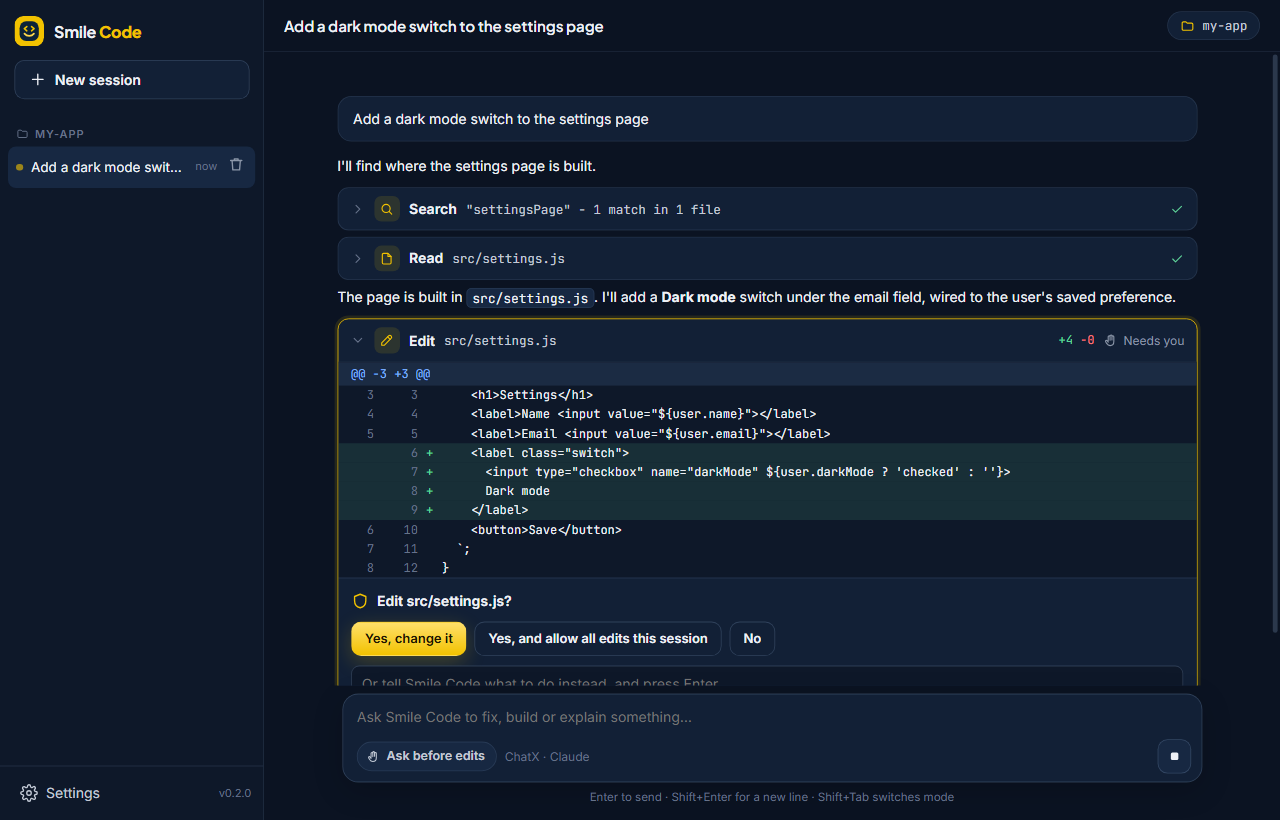
Like having a careful senior engineer on call.
It works in the folder you open, on your own computer. You see every change before it happens.
Understands your code
Reads files, lists folders and searches the whole project before it answers - no guessing at names or paths.
Changes only with your OK
Every edit is shown as a diff first. Say yes, no, or tell it what to do instead.
Runs commands and tests
Builds, tests and scripts run in your project folder - after you allow them - and it fixes what breaks.
Plan mode
Let it look around and write a step-by-step plan without changing a thing. Approve it, then build.
Free Claude with Puter
Sign in with a free Puter account and use Claude Sonnet 5, Opus 5.5 and more - no API key, no card.
Private by design
It can only touch the folder you open. Keys are encrypted by your operating system. No tracking - your code only goes to the AI you choose.
Three steps. That's it.
Download and open a folder
Install Smile Code, then open the project you want help with.
Choose your AI
Sign in with Puter for free, or add a key for ChatX, OpenAI, OpenRouter, NVIDIA or Anthropic.
Ask
"Fix the failing tests", "add a dark mode", "explain this project" - and watch it work.
Switch modes any time with Shift + Tab.
Use the AI you like.
Pick one in Settings and switch whenever you want. Your conversations carry on.
Puter
Claude Sonnet 5, Claude Opus 5.5, GPT and Gemini on your own free Puter account.
ChatX
The ChatX API with Claude, GPT, Gemini, DeepSeek and Grok.
OpenAI-compatible
OpenAI, OpenRouter, NVIDIA, Groq, or a model on your own computer with LM Studio.
Anthropic
Your own Anthropic API key, straight to Claude.
Smile Code in your browser, on your servers.
Sign in with your Smile account and point Smile Code at one of your Smile Hosting servers. It reads, edits and runs commands there - with your own permissions, and it still asks first.
Your servers, one click away
Every server you own or that's shared with you. It can only do what your account is allowed to.
Sessions saved for you
Pick up any conversation on any computer. With Pro, sessions from the desktop app show up here too.
Linked with the app
In the desktop app, Settings → Account → Sign in with Smile. Your plan follows you everywhere.
Free to use. More when you want it.
The desktop app is free, forever. Plans add more AI on the web, unlimited sessions and sync between your computer and the web.
Free
- The full desktop app
- Every AI - free Claude with Puter, or your own key
- The web version with 5 saved sessions
- On the web: 15k AI tokens every 5 hours, 100k a week
- Desktop sessions synced to the web
Pro
- Everything in Free
- On the web: 200k AI tokens every 5 hours, 1.5M a week
- Unlimited web sessions
- Desktop sessions synced to the web
- Priority support from Smile Corp
Pro+
- Everything in Pro
- 25× Pro's AI on the web: 5M tokens every 5 hours, 37.5M a week
- For long coding sessions every day
Max
- Everything in Pro+
- 50× Pro's AI on the web: 10M tokens every 5 hours, 75M a week
- For all-day, every-day work
Pay by card, or with credit on your account. Got a promo code? Type it in when you pay.
Give Smile Code
Gift cards for Pro - 1 month (£4.99), 3 months (£13.99) or a year (£49) - or credit to spend on any plan (£5, £10, £25).
Get Smile Code
It keeps itself up to date: Settings → Updates checks for new versions and installs them - each one signed by Smile Corp.
Windows
Windows 10 or 11, 64-bit
If Windows warns you
Smile Code isn't code-signed yet, so Windows may say "Windows protected your PC". Click More info → Run anyway. Updates inside the app are checked against Smile Corp's own signature.
Linux
64-bit (x86-64) AppImage
How to run it
Make it executable (chmod +x Smile-Code-*.AppImage, or right-click → Properties → Allow executing), then open it. On Ubuntu 24.04+ you may need to allow its sandbox with an AppArmor profile.
Mac
Apple Silicon and Intel
Questions
Is Smile Code free?
Yes. The desktop app is free, and with Puter you can use Claude for free on your own Puter account (Puter gives each account a free allowance). If you use your own API key with another service, that service charges you as normal. Plans - Pro from £4.99 a month, and Pro+ and Max for much more AI - add unlimited web sessions, syncing between your computer and the web, and more AI on the web.
Do I need an account?
Not for the desktop app. The web version uses your Smile account - the same one as Smile Hosting and SmileMail - because it works on your Smile Hosting servers. You can link the desktop app to it too, to see your plan and sync sessions.
What are the AI limits?
On the web, Smile Code counts tokens - roughly the words sent to the AI and back, including the files it reads. The free plan gets 15,000 every 5 hours and 100,000 a week; Pro gets 200,000 every 5 hours and 1.5 million a week. When you hit a limit it stops until usage from earlier frees up - the gauge at the bottom right shows where you are. The desktop app with your own AI key has no Smile limits.
How do gift cards work?
Buy one on your account page and you get a code like SMILE-XXXX-XXXX-XXXX. Whoever redeems it gets that many months of Pro added to their account - on top of any Pro they already have. Codes don't expire and work once.
Does my code leave my computer?
Only what Smile Code sends to the AI you choose - the parts of your project it reads for your task, and your messages. Smile Corp doesn't receive your code, and the app has no tracking. The only other thing it contacts is code.smilecorp.co.uk, to check for updates (and, if you sign in, your plan and - with Pro and sync turned on - your sessions).
Can it break my project?
By default it asks before every change and every command, and shows you exactly what will change. It can't touch anything outside the folder you open. Use git (or a copy) for anything important, as with any tool that edits code.
Where are my API keys kept?
On your computer, encrypted by your operating system's own key store (Windows DPAPI, the Linux keyring). The app never shows them again, and only sends each one to its own service.
How do updates work?
Open Settings → Updates → Check for updates. Smile Code downloads the new version, checks that it's signed by Smile Corp and matches its checksum, installs it and restarts. You'll see a gold dot on Settings when a new version is out.
Is there a Mac version?
Not yet - it's coming. In the meantime Smile Code runs on Windows and Linux.
Ready to build something?
It takes a minute to install. Your first task can be "explain this project".